'Python_Story'에 해당되는 글 1건
- 2020.02.07 :: 주피터 노트북에서 pdf로 파일 저장하기 6
<주피터 노트북에서 pdf로 파일 저장하기>
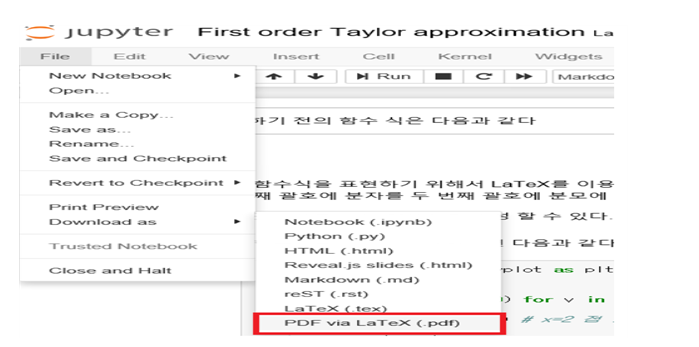
File – Download as – Pdf via Latex via(.pdf) 선택하여 저장 시도 => 에러 발생!!

<해결 방법>
1단계) https://nbconvert.readthedocs.io/en/latest/install.html#installing-tex 사이트로 이동

1) Windows : MikText 클릭 => miktex.org 사이트로 이동

2) Downloads 클릭

3) Download 버튼 선택 => “basic-miktex-2.9.7269-x64.exe” 파일 다운로드
4) 다운로드한 “basic-miktex-2.9.7269-x64.exe” 파일을 default로 설치하기(더블 클릭)
5) 주피터에서 File – Download as – Pdf via Latex via(.pdf) 선택하여 저장
6) 패키지 설치 창이 10개 이상 계속 뜨므로 계속 install 버튼을 클릭하여 패키지 설치

7) 여러번의 패키지 설치가 끝나면 File – Download as – Pdf via Latex via(.pdf)로 저장
2단계) pdf 파일은 다운이 되나 한글이 깨짐!!!
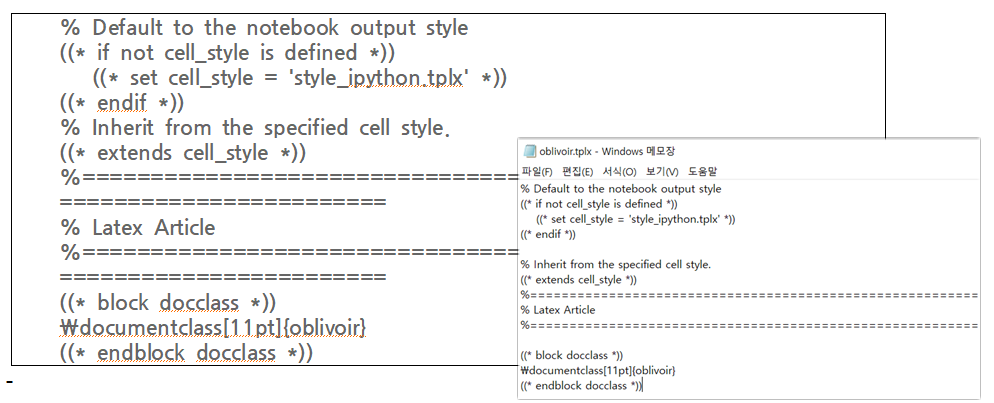
1) pdf로 저장하고자 하는 ipynb 파일이 있는 경로에 아래의 코드를 복사하여 “oblivoir.tplx” 이름으로 메모장을 이용하여 생성한다.
% Default to the notebook output style
((* if not cell_style is defined *))
((* set cell_style = 'style_ipython.tplx' *))
((* endif *))
% Inherit from the specified cell style.
((* extends cell_style *))
%===============================================================================
% Latex Article
%===============================================================================
((* block docclass *))
\documentclass[11pt]{oblivoir}
endblock docclass *))
2) 터미널(cmd)에서(“파일이름.ipynb” 이름이 있는 경로로 이동하여)
jupyter nbconvert 파일이름.ipynb --to pdf --template=oblivoir.tplx
명령을 실행하면 한글이 깨지지 않은 pdf 파일 저장 성공!!!

3) pdf 파일 확인